How to Find a Competitor’s Google Ads


Find a competitor’s Google ads in Ads Transparency Center. Check the advertiser, country and date filters before interpreting the results.
Digital Boom tested the public workflow with canva.com on November 26, 2026. The useful detail was the difference between a website’s results and one advertiser’s records. Changing that scope changed the approximate ad count.
In this story6 sections
Search by name or website
Open Google Ads Transparency Center and enter the advertiser’s name or website. Google describes the tool as a searchable repository of advertisers and ads in its transparency guidance.
What if a website query returns unfamiliar companies? Check the search mode. In our test, searching canva.com and choosing See more results opened By advertiser name, with Canvas-related names among the results. Switching to By domain offered the exact canva.com website as a separate choice.
The domain page warned that results included multiple advertiser accounts with ads pointing to the website. A website match therefore was not the same selection as an individual advertiser profile.
Check the country and dates again
After selecting the domain, inspect Ads In. Our selection changed from United States to anywhere during that step, so we selected United States again. This was an observed behavior in one test, not a claim about every search.
Choose a date range and confirm it. Our Last 30 days preset displayed October 27 through November 25, 2026, with Pacific Time as the date basis. Record the displayed dates when saving your research, rather than relying on the preset’s name later.
Separate platform from format
Which filter finds Search ads? We selected Google Search in the platform menu, then Text in the separate format menu. The menus control different parts of the selection.
Under United States, Last 30 days, Google Search and Text, the canva.com domain view displayed approximately 1,000 ads. These were the tool’s changing, rounded results under those filters, not a count of campaigns or proof of a company’s entire advertising activity.
Open the ad and its advertiser profile
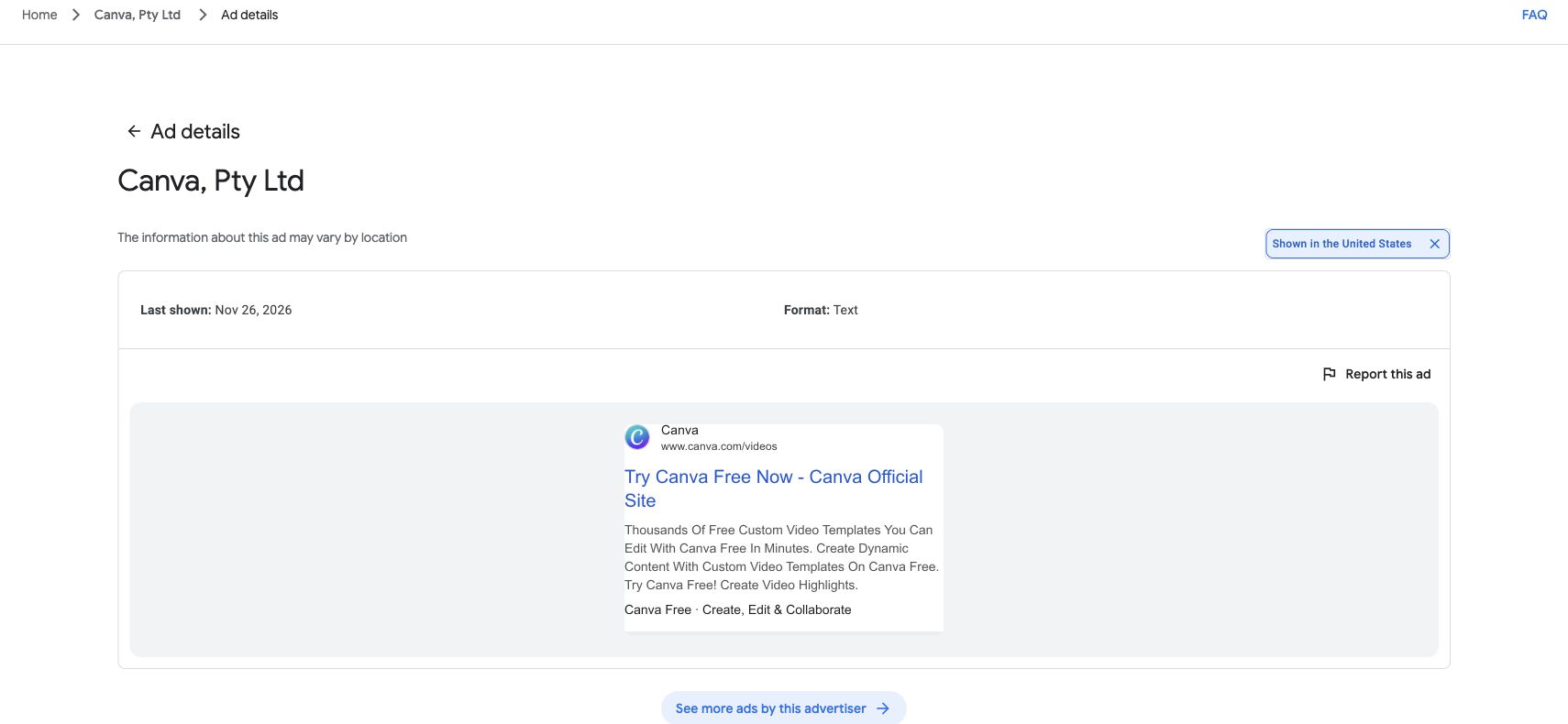
Open the full-size ad-record screenshot.
Select an ad card to inspect its record. Our example showed Text format, United States and a Last shown date of November 26, 2026. That detail date differed from the listing preset’s November 25 end date. Keep the record’s dates with their labels; they do not establish uninterrupted delivery throughout a selected period.
Choose See more ads by this advertiser to inspect the entity. Google displayed Canva, Pty Ltd, Australia and a verified-identity badge. Its advertiser view showed approximately 900 ads with the selected filters preserved.
Can you compare that number with the domain total? Only after recognizing the different scopes. Do not subtract rounded counts to calculate an exact number of ads from other accounts, or treat a verification badge as evidence of campaign performance.
Understand missing previews and click-through limits
Does an empty result prove a competitor has stopped advertising? No. Google’s current FAQ identifies coverage and technical limits, and says ad information may take 48–72 hours to appear. It also says a creative can fail to display for technical reasons.
Can you use the ad preview to verify its landing page? The FAQ says the center is not intended for landing-page verification or click-through validation. Avoid older instructions that depend on clicking through a preview.
Google also describes extra disclosures for some regions and political ads. Keep the guide’s ordinary commercial example separate from those special disclosures; a missing field in one record does not prove that every record lacks it.
Turn the evidence into a research brief
Save the domain or advertiser URL, country, displayed period, platform, format and ad-record link. Note the offer, creative approach and question you want to test in your own advertising.
This test did not expose competitors’ bids, targeted keywords, spend, conversions or profit. Use the public records for creative research. When evaluating your own campaign, our CPC guide explains click costs, while our conversion-rate guide explains the action and denominator behind a rate. A visible ad alone is no evidence that its advertiser made money.