
How to Check Active Ads in Meta Ad Library


Find an advertiser’s active ads in Meta Ad Library, record the filters and read grouped versions before treating a result count as a total.
A count becomes useful when someone else can repeat the search. Keep the advertiser’s Page, country, status and date beside the number, rather than copying it into a competitor report without that context.
In this story6 sections
Where do you find the active-ad count?
Open Meta Ad Library, select a country and choose All ads. Search for the advertiser, then select the intended Page from the suggestions. A keyword search and a search for a particular Page are different starting points.
Open Filters and check that Active status is set to Active ads. Read the results heading above the ads. If it includes a tilde, such as “~360 results,” retain that approximation when you record it.
Meta’s search instructions describe country, impression-date, platform and keyword filters. Record any filters you apply. The displayed result is tied to that search; do not describe it as the advertiser’s worldwide account total.
How do grouped ads affect a manual count?
Read the labels on each result before counting cards. A card can group several ads using the same creative and text. Select See summary details to inspect the group when that option appears.
In our November 26, 2026 check, one Pepsi card said four ads used the creative and text. Its summary showed four ad versions with four distinct Library IDs. One visible card therefore represented more than one ad in that example.
Meta’s summary explained that advertisers can reuse an image or video and text in ads with different dates, locations or budgets. Keep the number of ads separate from the number of creative ideas you identify.
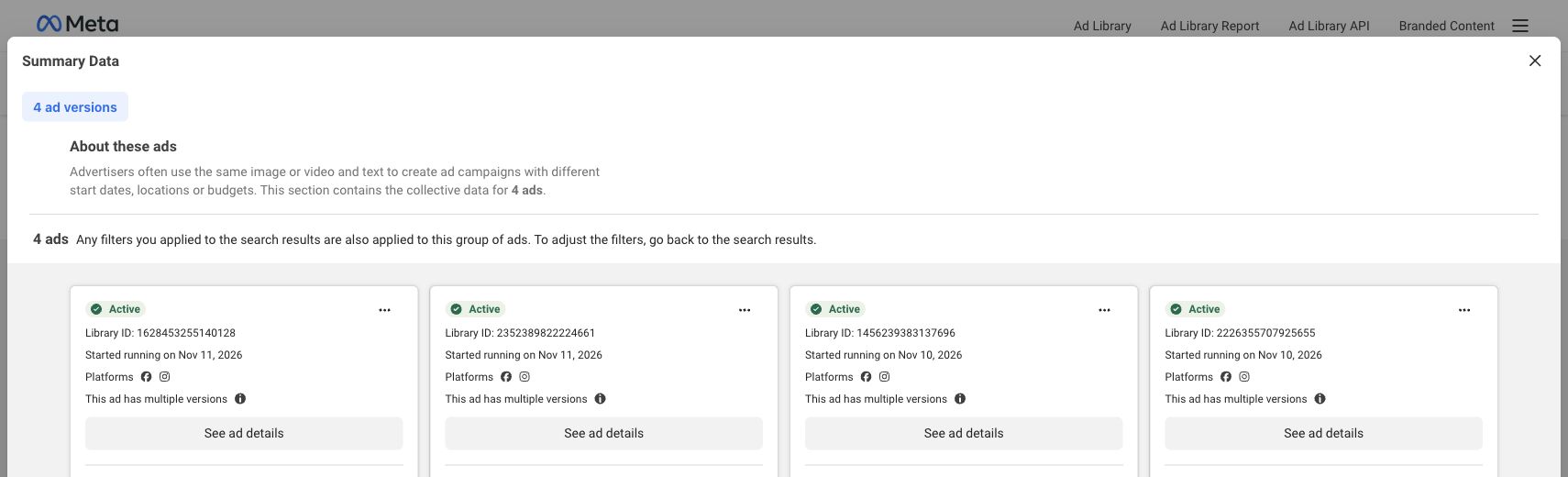
One result card opened a summary containing four ads. Meta Ad Library, November 26, 2026; screenshot cropped to the summary and ad metadata. Open the full-size screenshot.
What happened when we changed a filter?
We selected the PepsiUS Page with United States, All ads and Active ads. The heading showed approximately 360 results. Adding the Instagram platform filter also showed approximately 360, and the first Library ID appeared in both views.
That is a dated example of overlapping filtered views. It does not establish Pepsi’s total advertising activity, explain why the approximate headings matched or measure the results of its campaigns. Do not add platform-filtered counts together to calculate a unique total.
What should you check if no ads appear?
Recheck the selected Page, country, category and filters. Similar names and regional Pages can lead to different searches. An empty filtered view alone cannot settle whether an advertiser has any activity elsewhere.
The Ad Library’s current FAQ says ads appear within 24 hours of their first impression, and updates can also take up to 24 hours to appear. It also describes historical coverage for political ads and ads shown in the EU and UK. A current active-ad search and an archive search answer different questions.
Can an active-ad count show what performs best?
Use it as an activity snapshot. The count alone does not establish sales, return on ad spend or profit. A long-running ad can be worth examining, but its start date alone does not prove commercial success.
For a useful research note, separate what you observed from what you want to test: the visible message, format and offer are observations; your explanation of why they might work is a hypothesis.
How should you record the search?
Keep the Page link, search date, country, category, active status, platform and other applied filters alongside the displayed count. Add Library IDs for particular examples so a colleague can identify the ads you examined.
Digital Boom’s 2018 report on Page-ad transparency records the earlier Info and Ads feature. Use that as historical context; the counting method here follows the current Ad Library interface.


